> ## Documentation Index
> Fetch the complete documentation index at: https://docs.siftly.ai/llms.txt
> Use this file to discover all available pages before exploring further.
# Conversations
> Browse the prompts and AI responses behind your visibility, right down to the individual products that were recommended.
 ## Overview
Your metrics roll up from thousands of individual AI answers. Conversations is where you see the raw material: every **prompt** Siftly runs against AI shopping engines, and the **responses** behind your numbers.
## Prompts, responses, and recommended products
Siftly's analysis follows a simple chain:
1. A **prompt** is the shopper question Siftly asks (for example, "best budget espresso machine").
2. Running a prompt produces one or more **responses**: the AI's answers, across platforms and over time.
3. Each response contains **recommended products** (the tiles), each with a rank, plus the **citations** behind the answer.
## Browsing
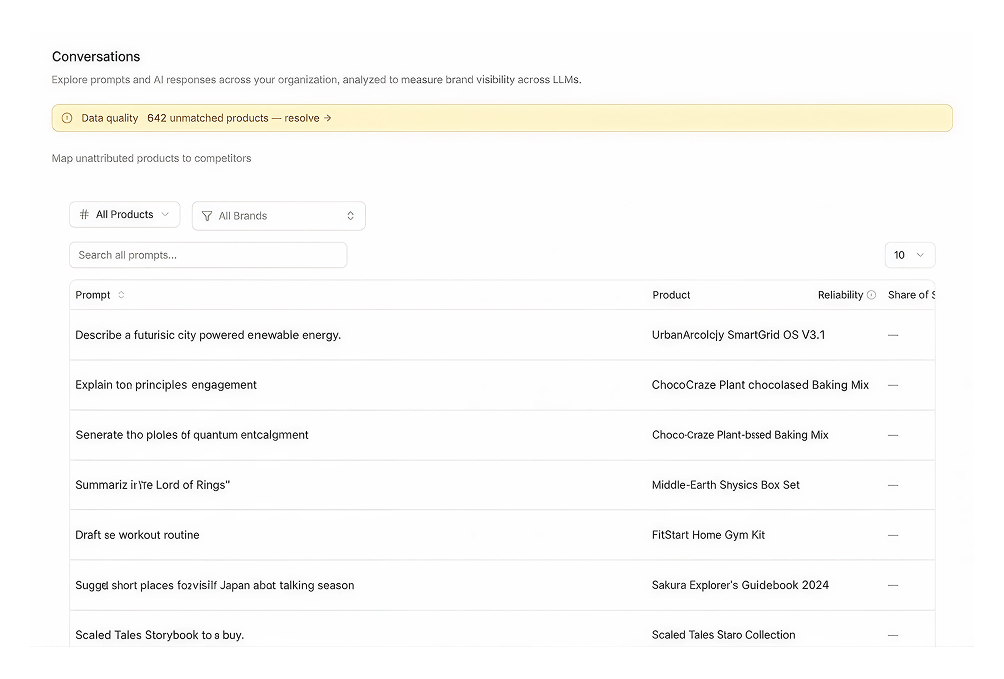
The prompts table lists each prompt with its product, brand, response count, and visibility metrics. Use the search box and the product, brand, and date filters to find what you need.
## Drilling into a prompt
Click any prompt to open its detail view:
* The full prompt text and its metadata
* Every response, with the recommended products and citations it contained
* Visibility for that prompt over time
Prompts where you never appear are pure opportunity. Use them to brief [Content](/shopping/content/blog) and [Product Optimization](/shopping/content/product-optimization).
## Related
See the metrics these conversations roll up to.
Analyze the sources cited across responses.
Connect prompts to the products they mention.
Turn gap prompts into content.
## Overview
Your metrics roll up from thousands of individual AI answers. Conversations is where you see the raw material: every **prompt** Siftly runs against AI shopping engines, and the **responses** behind your numbers.
## Prompts, responses, and recommended products
Siftly's analysis follows a simple chain:
1. A **prompt** is the shopper question Siftly asks (for example, "best budget espresso machine").
2. Running a prompt produces one or more **responses**: the AI's answers, across platforms and over time.
3. Each response contains **recommended products** (the tiles), each with a rank, plus the **citations** behind the answer.
## Browsing
The prompts table lists each prompt with its product, brand, response count, and visibility metrics. Use the search box and the product, brand, and date filters to find what you need.
## Drilling into a prompt
Click any prompt to open its detail view:
* The full prompt text and its metadata
* Every response, with the recommended products and citations it contained
* Visibility for that prompt over time
Prompts where you never appear are pure opportunity. Use them to brief [Content](/shopping/content/blog) and [Product Optimization](/shopping/content/product-optimization).
## Related
See the metrics these conversations roll up to.
Analyze the sources cited across responses.
Connect prompts to the products they mention.
Turn gap prompts into content.