> ## Documentation Index
> Fetch the complete documentation index at: https://docs.siftly.ai/llms.txt
> Use this file to discover all available pages before exploring further.
# Dashboard overview
> Your brand's AI shopping health at a glance: appearances, reliability, top-3 rank, and the data-quality items worth resolving.
 ## Overview
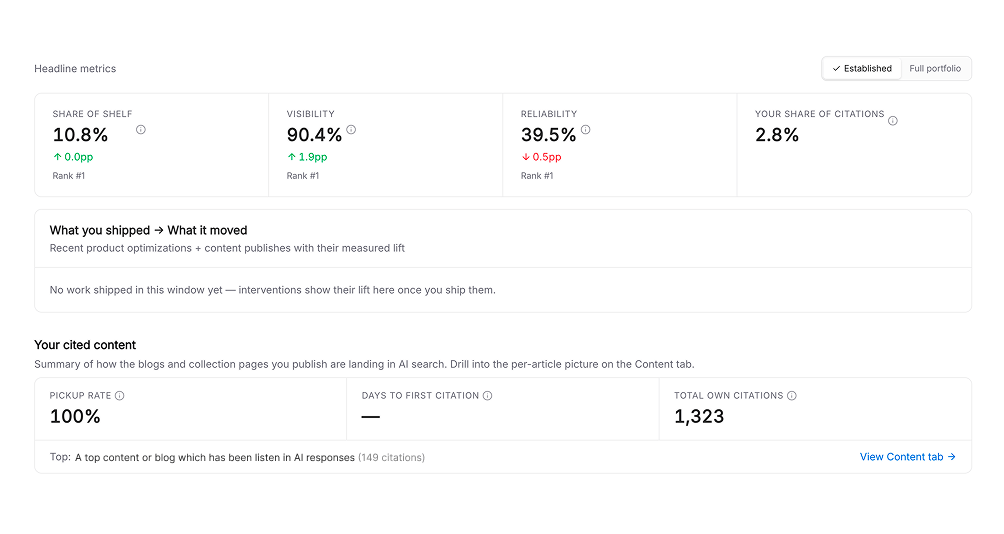
The dashboard is your starting point each time you log in. It summarizes how your products are showing up in AI shopping answers, surfaces the content AI is already citing, and flags data worth cleaning up, each with a change versus the previous period.
## Headline metrics
| Metric | What it tells you |
| ------------------------ | ------------------------------------------------------------------------- |
| **Appearances** | How often your products showed up as tiles across tracked prompts |
| **Reliability** | The share of responses where your brand appeared at least once |
| **Top-3 rank** | The share of responses where your product placed in the first three tiles |
| **Relative Price Index** | How your pricing compares to the competitive average |
| **Content performance** | How the content you've published is performing in AI answers |
For precise definitions, see [What is Share of Shelf?](/shopping/concepts/share-of-shelf).
## Cited content
The dashboard highlights your own pages that AI shopping engines have recently cited, a quick read on which content is earning its place on the shelf. Dig deeper on the [Citations](/shopping/analytics/citations) page.
## Data quality
Siftly flags items it couldn't confidently match: products or brands seen in AI answers that don't line up with your catalog. Resolving these keeps your metrics accurate. Each item links into [Conversations](/shopping/analytics/conversations) so you can see the context.
If you've just onboarded, some cards will be empty until your first analysis completes. Newly tracked products also spend their first 14 days in a warm-up cohort before counting toward headline Share of Shelf.
## Where to go next
Track shelf share and competitive position over time.
See which sources AI engines cite in your market.
Find untapped products to prioritize.
Read the prompts and responses behind your metrics.
## Overview
The dashboard is your starting point each time you log in. It summarizes how your products are showing up in AI shopping answers, surfaces the content AI is already citing, and flags data worth cleaning up, each with a change versus the previous period.
## Headline metrics
| Metric | What it tells you |
| ------------------------ | ------------------------------------------------------------------------- |
| **Appearances** | How often your products showed up as tiles across tracked prompts |
| **Reliability** | The share of responses where your brand appeared at least once |
| **Top-3 rank** | The share of responses where your product placed in the first three tiles |
| **Relative Price Index** | How your pricing compares to the competitive average |
| **Content performance** | How the content you've published is performing in AI answers |
For precise definitions, see [What is Share of Shelf?](/shopping/concepts/share-of-shelf).
## Cited content
The dashboard highlights your own pages that AI shopping engines have recently cited, a quick read on which content is earning its place on the shelf. Dig deeper on the [Citations](/shopping/analytics/citations) page.
## Data quality
Siftly flags items it couldn't confidently match: products or brands seen in AI answers that don't line up with your catalog. Resolving these keeps your metrics accurate. Each item links into [Conversations](/shopping/analytics/conversations) so you can see the context.
If you've just onboarded, some cards will be empty until your first analysis completes. Newly tracked products also spend their first 14 days in a warm-up cohort before counting toward headline Share of Shelf.
## Where to go next
Track shelf share and competitive position over time.
See which sources AI engines cite in your market.
Find untapped products to prioritize.
Read the prompts and responses behind your metrics.