> ## Documentation Index
> Fetch the complete documentation index at: https://docs.siftly.ai/llms.txt
> Use this file to discover all available pages before exploring further.
# Traffic
> See which AI crawlers read your store, and how much traffic AI assistants and organic search drive, via Cloudflare, Google Analytics 4, and Search Console.
 ## Overview
Visibility on the AI shelf only matters if it turns into reads and then visits. The Traffic page brings both sides together: which AI and search crawlers read your pages (via **Cloudflare**), and how many shoppers then arrive from AI assistants and organic search (via **Google Analytics 4** and **Google Search Console**).
Traffic covers two complementary signals. **Crawler activity** (from Cloudflare) is which AI and search bots read your pages at the edge. **Referral and search analytics** (from GA4 and Search Console) is which shoppers actually arrive. Crawls are the leading indicator; visits are the outcome.
## AI crawler activity (Cloudflare)
With [Cloudflare connected](/shopping/integrations/cloudflare), the page shows which AI and search crawlers read your store at the edge:
* **Crawler Activity** split into AI Citations, AI Indexing, and AI Training, with a per-bot breakdown
* **Top Crawled Pages**, and per bot, the pages each one hits
* A **Platform-to-Page Journey** view and a Published Articles table that ties crawler activity to AI referrals and Search Console data
Crawler data starts accumulating when you connect, with no backfill, so connect early. On the Cloudflare Free plan this is hourly, user-agent-based data, which is enough for trend analysis; per-request logs need a Cloudflare Enterprise plan.
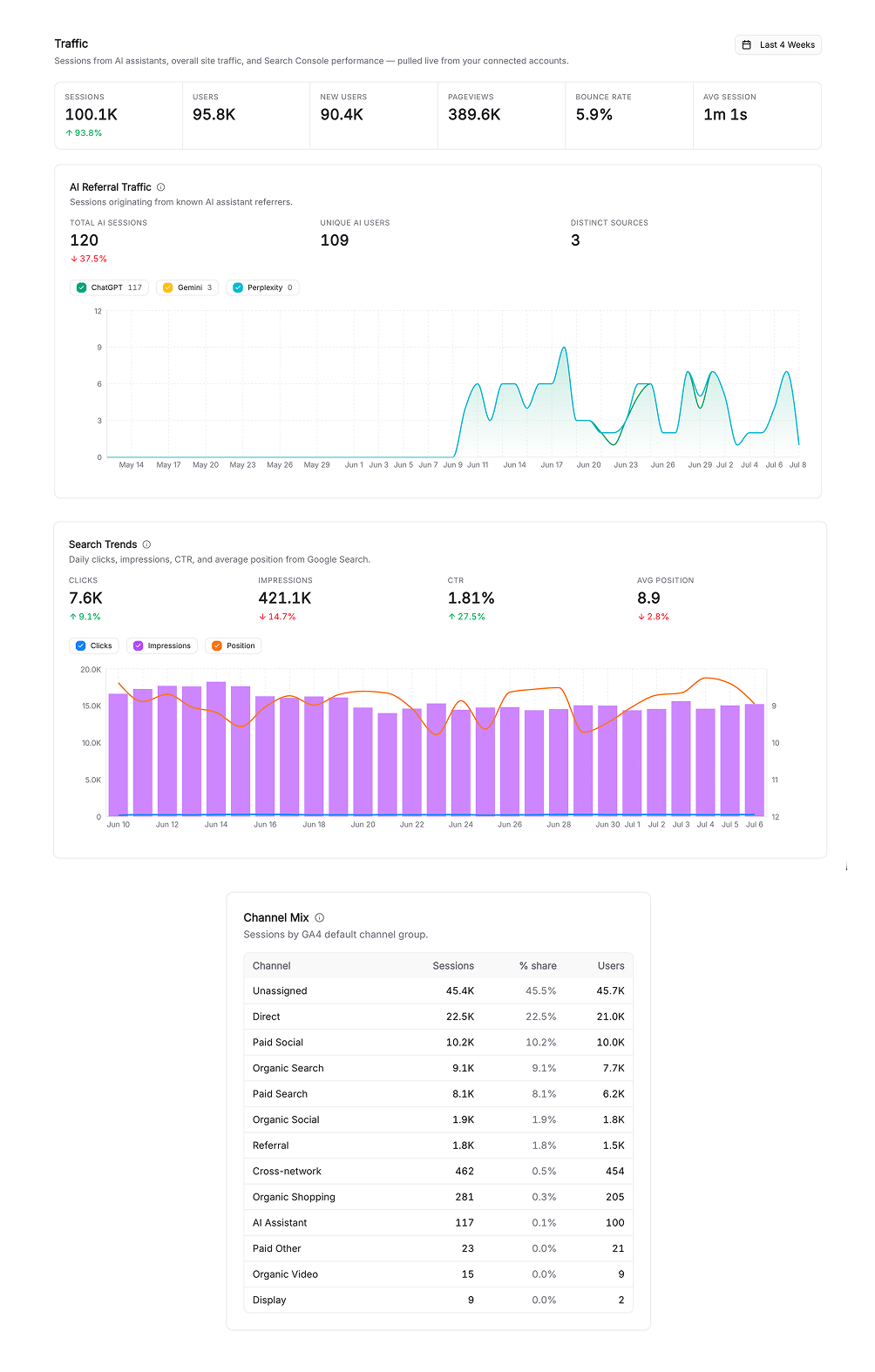
## AI referral traffic (GA4)
With [GA4 connected](/shopping/integrations/ga4), the page shows:
* Headline metrics: sessions, users, and engagement, with period-over-period change
* **AI referral traffic** broken down by assistant (ChatGPT, Perplexity, and others)
* Channel mix across your traffic sources
* Your top pages by AI-assistant traffic
## Organic search (Search Console)
With [Search Console connected](/shopping/integrations/google-search-console), the page shows:
* Clicks and impressions over time
* Click-through rate and average position
* Top queries and pages driving organic search
## Getting set up
If an integration isn't connected, the page shows a connect card; if access expires, you'll see a reconnect prompt. GA4 and Search Console connect with read-only Google OAuth, and Cloudflare uses a read-only API token you generate.
Watch AI referral traffic alongside your [Share of Shelf](/shopping/analytics/visibility). As shelf share rises, referral sessions from AI assistants should follow, confirming your gains are translating into visits.
## Related
Connect GA4 for referral traffic.
Connect GSC for organic search.
Connect Cloudflare for AI crawler activity.
Correlate traffic with shelf share.
See which sources drive AI recommendations.
## Overview
Visibility on the AI shelf only matters if it turns into reads and then visits. The Traffic page brings both sides together: which AI and search crawlers read your pages (via **Cloudflare**), and how many shoppers then arrive from AI assistants and organic search (via **Google Analytics 4** and **Google Search Console**).
Traffic covers two complementary signals. **Crawler activity** (from Cloudflare) is which AI and search bots read your pages at the edge. **Referral and search analytics** (from GA4 and Search Console) is which shoppers actually arrive. Crawls are the leading indicator; visits are the outcome.
## AI crawler activity (Cloudflare)
With [Cloudflare connected](/shopping/integrations/cloudflare), the page shows which AI and search crawlers read your store at the edge:
* **Crawler Activity** split into AI Citations, AI Indexing, and AI Training, with a per-bot breakdown
* **Top Crawled Pages**, and per bot, the pages each one hits
* A **Platform-to-Page Journey** view and a Published Articles table that ties crawler activity to AI referrals and Search Console data
Crawler data starts accumulating when you connect, with no backfill, so connect early. On the Cloudflare Free plan this is hourly, user-agent-based data, which is enough for trend analysis; per-request logs need a Cloudflare Enterprise plan.
## AI referral traffic (GA4)
With [GA4 connected](/shopping/integrations/ga4), the page shows:
* Headline metrics: sessions, users, and engagement, with period-over-period change
* **AI referral traffic** broken down by assistant (ChatGPT, Perplexity, and others)
* Channel mix across your traffic sources
* Your top pages by AI-assistant traffic
## Organic search (Search Console)
With [Search Console connected](/shopping/integrations/google-search-console), the page shows:
* Clicks and impressions over time
* Click-through rate and average position
* Top queries and pages driving organic search
## Getting set up
If an integration isn't connected, the page shows a connect card; if access expires, you'll see a reconnect prompt. GA4 and Search Console connect with read-only Google OAuth, and Cloudflare uses a read-only API token you generate.
Watch AI referral traffic alongside your [Share of Shelf](/shopping/analytics/visibility). As shelf share rises, referral sessions from AI assistants should follow, confirming your gains are translating into visits.
## Related
Connect GA4 for referral traffic.
Connect GSC for organic search.
Connect Cloudflare for AI crawler activity.
Correlate traffic with shelf share.
See which sources drive AI recommendations.