> ## Documentation Index
> Fetch the complete documentation index at: https://docs.siftly.ai/llms.txt
> Use this file to discover all available pages before exploring further.
# Google Manufacturer Center
> Connect Google Manufacturer Center (GMfC) to publish authoritative, brand-owned product attributes that enrich how your products appear in Google.
 ## Overview
**Google Manufacturer Center (GMfC)** lets brand owners publish authoritative product information (materials, certifications, care instructions, features, and richer descriptions) straight to Google. Connecting it lets Siftly Shopping enrich your products with these manufacturer attributes and publish them on your behalf.
**Difficulty:** ⚠️ Medium. Connect with Google OAuth, then map your data to GMfC's attribute fields.
Google Manufacturer Center (**GMfC**) is **not** the same as Google Merchant Center (**GMC**). GMC is your product feed; GMfC is for brand-owned manufacturer attributes. Don't confuse the two. See [Google Merchant Center](/shopping/integrations/google-merchant-center).
***
## Prerequisites
* A Google Manufacturer Center account
* One or more brands **registered and approved** in Manufacturer Center
* A Google user with access to that account
***
## Connecting
Go to **Settings → Integrations** and click **Connect** next to **Google Manufacturer Center**. You'll be redirected to Google to authorize access.
Sign in with the Google account that manages Manufacturer Center and approve access.
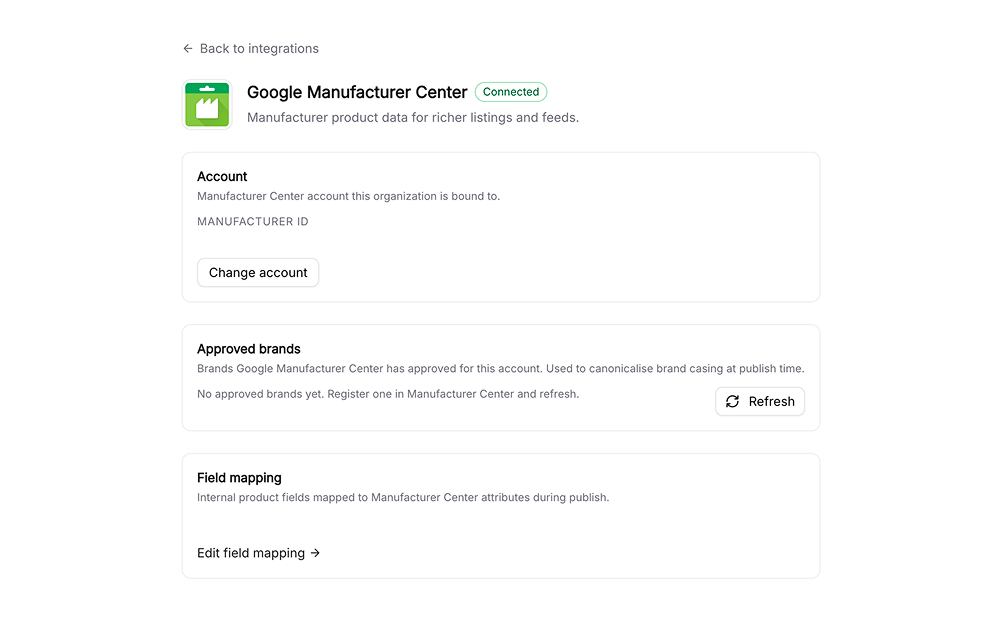
Choose the Manufacturer Center account to connect. Siftly binds to it and loads your **approved brands**: the brands Google has authorized you to publish attributes for.
You can refresh your approved-brands list any time from the GMfC card in **Settings → Integrations**.
***
## Field mapping
GMfC has its own set of attribute fields. The **field-mapping editor** controls how Siftly's product data maps to those fields.
* Siftly ships with sensible **default mappings** out of the box.
* You can **override** any mapping for your organization to match how your catalog is structured.
Open the editor at **Settings → Integrations → Google Manufacturer Center → Field mapping**.
Start with the defaults and only override the fields where your data lives somewhere non-standard. You don't need to map everything to get value.
***
## Publishing attributes
Manufacturer attributes are produced and submitted through [Product Optimization](/shopping/content/product-optimization). When a product belongs to an approved brand, Siftly writes the mapped attributes to Manufacturer Center for the relevant languages and countries.
A product can only be published to GMfC if its brand is approved in your Manufacturer Center account. Products whose brands aren't approved are skipped until approval comes through.
***
## Reconnecting and disconnecting
* **Reconnect**: If access expires, the GMfC card shows a reconnect prompt; re-authorize with Google.
* **Disconnect**: Go to **Settings → Integrations → Google Manufacturer Center** and click **Disconnect**. This removes stored credentials; attributes already published to Google remain.
***
## Troubleshooting
Your brand may not be registered or approved in Manufacturer Center yet. Register it in Google Manufacturer Center; approval can take time. Refresh the approved-brands list once it's granted.
Confirm the product's brand is in your approved-brands list and that the relevant fields are mapped in the field-mapping editor.
Open the field-mapping editor and override the default mapping for that field to point at the correct source in your catalog.
***
## Related
Connect your product feed for Google Shopping.
Generate and submit manufacturer attributes.
Compare every integration and what each one powers.
Ground attribute generation in your brand's facts and voice.
## Overview
**Google Manufacturer Center (GMfC)** lets brand owners publish authoritative product information (materials, certifications, care instructions, features, and richer descriptions) straight to Google. Connecting it lets Siftly Shopping enrich your products with these manufacturer attributes and publish them on your behalf.
**Difficulty:** ⚠️ Medium. Connect with Google OAuth, then map your data to GMfC's attribute fields.
Google Manufacturer Center (**GMfC**) is **not** the same as Google Merchant Center (**GMC**). GMC is your product feed; GMfC is for brand-owned manufacturer attributes. Don't confuse the two. See [Google Merchant Center](/shopping/integrations/google-merchant-center).
***
## Prerequisites
* A Google Manufacturer Center account
* One or more brands **registered and approved** in Manufacturer Center
* A Google user with access to that account
***
## Connecting
Go to **Settings → Integrations** and click **Connect** next to **Google Manufacturer Center**. You'll be redirected to Google to authorize access.
Sign in with the Google account that manages Manufacturer Center and approve access.
Choose the Manufacturer Center account to connect. Siftly binds to it and loads your **approved brands**: the brands Google has authorized you to publish attributes for.
You can refresh your approved-brands list any time from the GMfC card in **Settings → Integrations**.
***
## Field mapping
GMfC has its own set of attribute fields. The **field-mapping editor** controls how Siftly's product data maps to those fields.
* Siftly ships with sensible **default mappings** out of the box.
* You can **override** any mapping for your organization to match how your catalog is structured.
Open the editor at **Settings → Integrations → Google Manufacturer Center → Field mapping**.
Start with the defaults and only override the fields where your data lives somewhere non-standard. You don't need to map everything to get value.
***
## Publishing attributes
Manufacturer attributes are produced and submitted through [Product Optimization](/shopping/content/product-optimization). When a product belongs to an approved brand, Siftly writes the mapped attributes to Manufacturer Center for the relevant languages and countries.
A product can only be published to GMfC if its brand is approved in your Manufacturer Center account. Products whose brands aren't approved are skipped until approval comes through.
***
## Reconnecting and disconnecting
* **Reconnect**: If access expires, the GMfC card shows a reconnect prompt; re-authorize with Google.
* **Disconnect**: Go to **Settings → Integrations → Google Manufacturer Center** and click **Disconnect**. This removes stored credentials; attributes already published to Google remain.
***
## Troubleshooting
Your brand may not be registered or approved in Manufacturer Center yet. Register it in Google Manufacturer Center; approval can take time. Refresh the approved-brands list once it's granted.
Confirm the product's brand is in your approved-brands list and that the relevant fields are mapped in the field-mapping editor.
Open the field-mapping editor and override the default mapping for that field to point at the correct source in your catalog.
***
## Related
Connect your product feed for Google Shopping.
Generate and submit manufacturer attributes.
Compare every integration and what each one powers.
Ground attribute generation in your brand's facts and voice.