

Overview
Siftly Shopping is subscription-based. You start on a free trial and upgrade to a paid plan as your needs grow. This page covers the plans, how to start and manage a subscription, and how usage works.Plans
Plan names, limits, and included features are shown live on the plan-selection screen. Treat that screen as the source of truth for what each plan includes.
Starting and upgrading
After onboarding, you’ll land on the plan-selection screen.1
Start your trial
Choose Try to begin your free trial and go straight to your dashboard.
2
Upgrade when ready
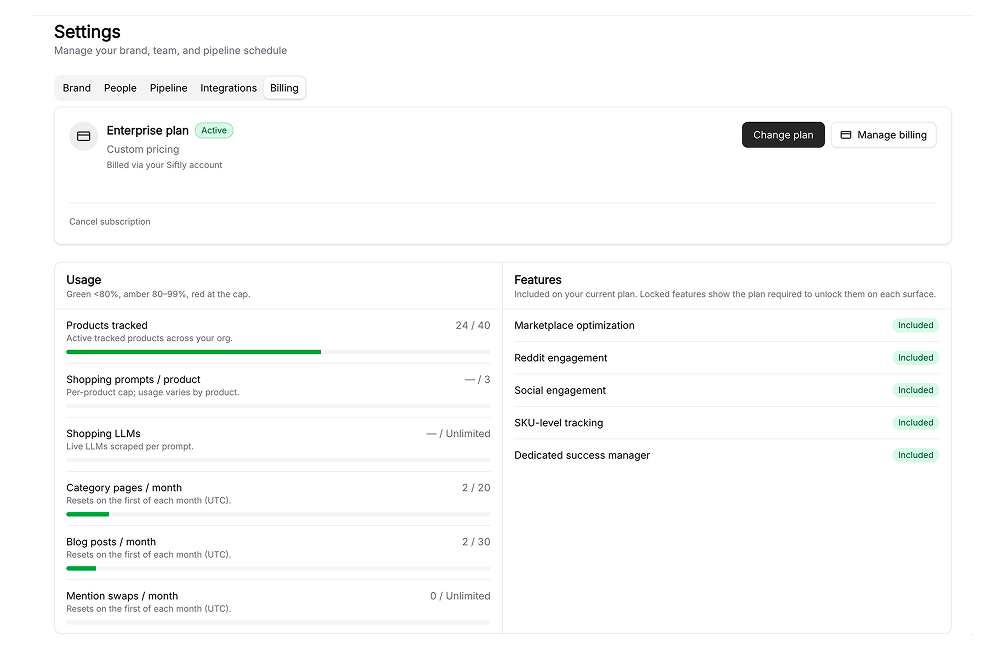
From Settings → Billing, pick a paid plan and complete checkout. Your plan and limits update immediately.
3
Manage anytime
Cancel or reactivate from Settings → Billing. Cancellations remain active until the end of your billing period.
How you’re billed
Siftly Shopping supports two billing paths:- Shopify Managed Pricing: merchants who install from the Shopify App Store are billed through Shopify.
- Stripe: existing merchants are billed through Stripe.
Usage and limits
Each plan includes limits on resources like monthly analysis and content generation. Track your usage against those limits in Settings → Billing. As you approach a limit you’ll see a warning; upgrading raises your limits right away.Related
Team & settings
Manage your organization and team.
Quickstart
New here? Set up and run your first analysis.