

Overview
Collection Pages turns a product into a complete, AI-ready Shopify collection page: a curated set of products with a written introduction, rationale for each pick, and FAQs. Well-structured collection pages are exactly the kind of content AI shopping engines like to cite and recommend. You can create a brand-new collection or optimize one you already have, then refine it by chat and publish to your store.How a collection comes together
It starts from where the product already lives
When you pick a product, Siftly checks its current coverage and chooses the right path:
This means you never accidentally create a duplicate collection for a product that’s already covered.
The generation pipeline
Once you choose, Siftly runs a short, multi-step pipeline in the background:1
Setup
Siftly gathers context about the product, your catalog, and the competitive and citation signals in your market.
2
Routing
Based on coverage, Siftly decides whether to write a full new collection or patch an existing one.
3
Writing
Siftly drafts the collection (an introduction, the product picks with a rationale for each, and supporting copy) grounded in evidence.
4
Finishing
The draft is humanized, checked against your brand rules, given SEO metadata and structured data, and validated.
Creating a collection
1
Pick a product
Go to Collections → Start a new collection and choose the product to build around.
2
Choose create or optimize
Siftly shows the product’s coverage and offers the right action: create new, optimize an existing collection, or open an existing Siftly draft.
3
Let it generate
The pipeline runs and opens the collection editor when it’s ready.
The editor
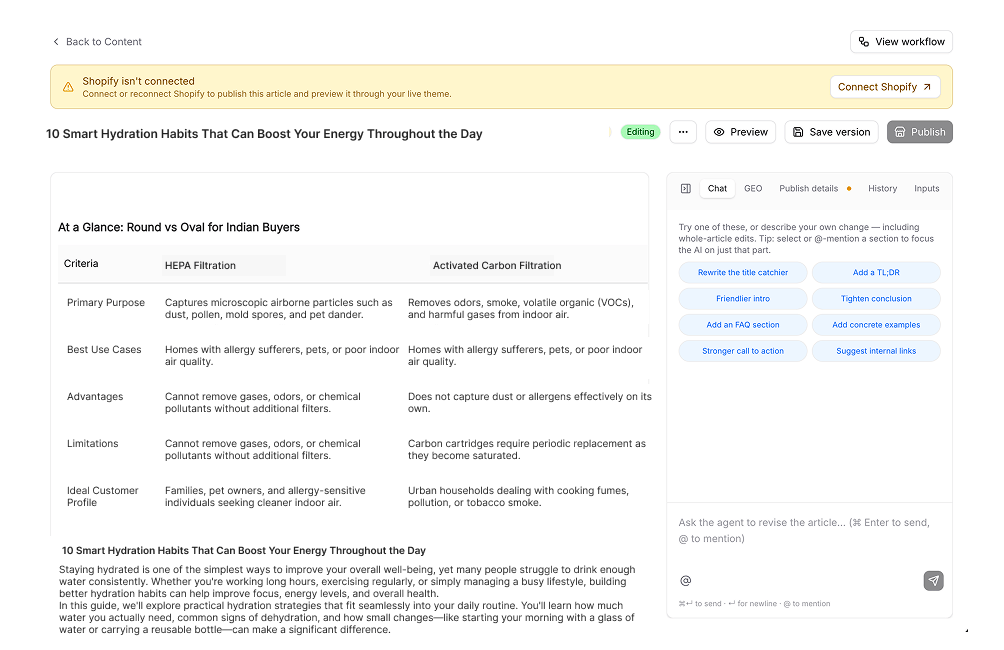
The editor shows a live rendered preview of the collection on the left: title, hero, description blocks, the product picks with their rationale, and FAQs. On the right are tabs:- Chat: make scoped edits in plain language. Pin a specific block to focus your edit on just that section.
- Publish: set SEO metadata, the hero image, the URL handle, and where it publishes.
- History: every accepted edit is versioned; click any version to compare.
- Inputs: the analysis and signals that informed the draft.
Validation and publishing
When you’re happy, click Approve to unlock publishing. On publish, Siftly validates the collection’s structure and checks it against your brand rules.If validation finds issues, Siftly lists them in a dialog with a Publish anyway option, so you stay in control of what goes live.
Related
Content & optimization overview
See all three ways Siftly turns insight into published improvements.
Content
Generate blog posts grounded in your brand and products.
Knowledge Hub
Ground every collection in your brand’s facts and voice.
Shopify
Connect your store to publish collections.